
JetX guide introduces the main flight process available through JL14 for Philippine members. It explains how rounds begin, how multipliers rise, and when cash-out requests become valid. This article serves new players who need clear instructions, accurate rules, and orderly betting steps.
What the JetX guide covers before flight
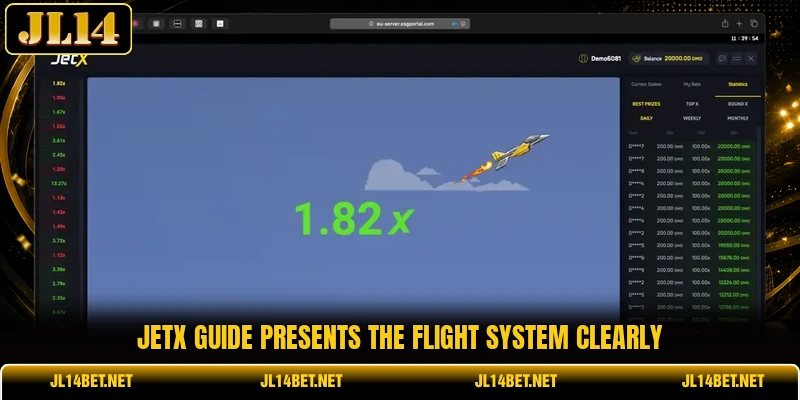
The game uses a virtual aircraft that moves when the betting window closes. Its multiplier rises during flight, then stops unpredictably without prior notice. A JetX guide helps members understand this sequence before placing any amount.
Each round accepts PHP or USD wagers according to the selected account currency. JL14 shows the stake, expected return, and cash-out control on one screen. Players must confirm every entry before the countdown reaches zero and takeoff begins.
The result depends on whether cash-out occurs before the aircraft leaves the screen. A successful request pays the stake multiplied by the displayed value at that moment. The JetX guide also clarifies that late requests receive no return after departure.
How each flight cycle follows game rules
Every round has a short entry period followed by an automatic flight sequence. Players should read the visible controls carefully because each button has a separate function.
Using the JetX guide correctly
The betting panel opens during countdown and displays the minimum accepted stake. Members may enter PHP 20, USD 1, or another amount within posted limits. The JetX guide recommends checking the currency field before confirming any wager.
Two bet boxes may appear, allowing different stakes within the same round. Each box has its own amount setting, confirmation button, and cash-out command. Players should verify which box remains active before making changes during the countdown.
Confirmed stakes lock when the aircraft begins moving across the display. Canceled entries are unavailable after takeoff because the round has already started. Members can prepare the next amount only after the current result becomes final.
Reading the rising multiplier
The multiplier starts near 1.00x and rises while the aircraft remains in flight. A higher figure produces a larger possible return when cash-out completes before departure. The value can stop quickly, so no fixed duration applies across separate rounds.
Members see the current number beside the aircraft during each active flight. This display updates continuously until the round ends or a request becomes successful. Historical results may appear nearby, but they cannot predict the next stopping point.
A return at 2.00x doubles the accepted stake before any platform deductions apply. For example, PHP 100 cashed out there produces a gross PHP 200 result. The same calculation applies to USD stakes using the account’s chosen settlement currency.
Choosing the cash out point
Manual cash-out requires pressing the active button while the aircraft still flies. The system records the multiplier shown when the request reaches the game server. Delays from connection speed may affect whether the command completes before departure.
Automatic cash-out lets members set a target multiplier before the round begins. The request triggers when the aircraft reaches that selected figure during normal flight. It fails when the aircraft leaves before touching the chosen target value.
This explanation covers both methods without claiming either guarantees a winning result. Manual control suits members who watch each movement and press the command directly. Automatic control suits players who prefer a preset exit point during every round.
View more: Aviator Multiplier – Track Flight Growth For Rewards
Checking round outcomes correctly
Completed rounds show the ending multiplier and each confirmed wager status. A winning entry includes the accepted stake, cash-out figure, and credited return amount. An unsuccessful entry shows no payout because departure happened before a valid request.
Members should compare the result panel with the balance change after settlement. Small processing delays may occur, although most completed rounds update within several seconds. Any missing result should be checked through the game history before support contact.
The record section lists time, stake, multiplier, return, and transaction reference. These details help players confirm whether two bet boxes settled under different outcomes. Clear records also separate completed wagers from canceled entries or rejected confirmations.

Steps for completing each flight round correctly
The JetX guide process becomes easier when players follow the controls in their correct order. Each step should finish before the next action begins, especially during the short countdown.
Starting a wager correctly
Members choose the account currency, then open the game from the lobby. The screen loads the aircraft, timer, betting boxes, and recent result history. Players should wait until every control appears before entering a stake.
Next, members type an amount within the displayed minimum and maximum limits. A PHP account may show different limits from a USD account during the same session. The confirmation button activates only when the entered figure meets all current conditions.
Players press bet before the countdown ends and then check the accepted status. A pending or rejected notice means the wager has not entered the round. The JetX guide treats visible acceptance as the final proof of successful entry.
Following timing without delay
After takeoff, members watch the multiplier and decide whether to request cash-out. The button remains active only while the aircraft continues moving on the screen. Pressing after departure cannot restore the stake or reopen the completed round.
Automatic settings must be entered before takeoff because changes are locked during flight. Members should confirm the chosen target beside the correct bet box before the timer closes. The JetX guide notes that separate boxes may carry different automatic targets.
When cash-out succeeds, the button changes status and shows the recorded multiplier. The credited amount then appears in the balance after the round settles. Players can compare this figure with the gross return shown inside the result panel.
Reviewing completed trip records
After settlement, members open history and locate the newest round by timestamp. The record should match the chosen stake, exit multiplier, and credited account amount. A different timestamp may belong to another flight completed only seconds earlier.
Players can review several rounds to confirm that each result appears in proper order. The JetX guide advises using transaction references when two wagers share identical stake amounts. These references distinguish separate entries without relying only on visible multiplier values.
Members may start another round after checking the previous balance update. The next stake should be confirmed again because settings may reset after reloading. Downloading the official app can provide steadier access on supported mobile devices.

View more Category: Arcade
Conclusion
JetX guide gives players a clear view of takeoff, multiplier growth, cash-out, and settlement. Members can use JL14 to follow each stage and review recorded outcomes carefully. Register, download the app, enter the game, and good luck with every flight.